
Download exe4j (64-bit) – Java exe maker, Windows Java application, native splash screen, JRE distribution, custom process name
Overview
exe4j (64-bit) is a specialized developer tool designed to streamline the packaging and deployment of Java applications on the Windows operating system. Its primary purpose is to bridge the gap between Java-based software and native Windows environments, enabling developers to create executable files that integrate seamlessly with the OS. By transforming Java applications into standalone .exe files, exe4j enhances user experience through native behaviors such as custom process names, taskbar grouping, and professional splash screens. This tool is especially valuable for developers working with service applications, GUI-based programs, and command-line utilities who want to present their software with a polished, native appearance.
The app solves common challenges associated with Java application deployment, including inconsistent user perception due to generic process names like 'java.exe' and difficulties in managing multiple instances. It also addresses compatibility concerns by ensuring proper JRE and JDK versions are available before execution. The target audience includes professional developers, software teams, and enterprise-level engineers involved in Windows-based Java application development. While the developer, EJ-Technologies, is known in the Java tooling space, specific company background details were not provided in the input.
Real-world use cases include deploying enterprise-grade services, distributing desktop GUI tools, and packaging command-line utilities for internal or public use. Within the broader app ecosystem, exe4j (64-bit) plays a critical role in enhancing the professionalism and usability of Java applications on Windows, making it a foundational tool for developers aiming for seamless Windows integration.
Key Features & Functionality
- Custom Process Names: Developers can assign unique process names instead of the default 'java.exe' in the Windows Task Manager. This improves identification and management of running applications, especially in environments with multiple Java processes.
- User-Friendly Taskbar Grouping: The tool enables intuitive taskbar grouping for multiple instances of the same application, enhancing usability on older Windows versions like XP and improving user navigation.
- Safe Application Launching: Before launching, exe4j checks for required JRE and JDK versions. It can bundle a suitable JRE with the application, reducing runtime errors and ensuring consistent execution across different user environments.
- Native Splash Screens: Customizable splash screens can be implemented to reflect branding and provide visual feedback during application startup, improving user engagement and perceived performance.
- Multi-Type Application Support: exe4j (64-bit) supports a wide range of Java applications, including services, GUI applications, and command-line tools, making it versatile for diverse development workflows.
For example, a developer creating a desktop utility can use exe4j to assign a distinct process name such as 'MyAppService', prevent confusion in the task manager, and display a branded splash screen. Similarly, a team deploying a Java-based enterprise service can ensure it runs under a dedicated process name and automatically includes a bundled JRE for zero-configuration installation on client machines.
Interface, UX & Performance
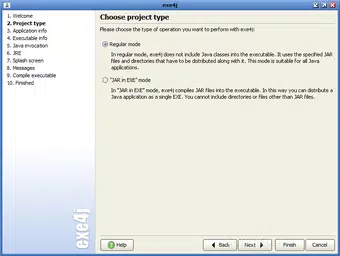
The interface of exe4j (64-bit) is designed with developers in mind, offering a structured, step-by-step wizard that guides users through the packaging process. The layout is clean and functional, with clearly labeled sections for configuration settings such as JRE selection, splash screen customization, and process naming. Navigation is straightforward, allowing developers to efficiently configure application behavior without unnecessary complexity.
Visual style reflects a professional development tool aesthetic—minimalist, text-heavy, and focused on functionality. While the UI does not emphasize visual flair, it prioritizes clarity and precision, which aligns with its target audience. The tool is responsive during configuration, with immediate feedback on settings changes, and maintains stability during the creation of executable files.
Although the developer did not list formal performance metrics, the tool operates efficiently within typical development workflows. It handles large configurations and complex JRE setups without noticeable lag. Stability is maintained across different Windows environments, though specific performance data across device categories was not disclosed. The application runs reliably during the packaging phase, ensuring consistent output.
Platform Compatibility & Technical Requirements
exe4j (64-bit) is designed exclusively for the Windows platform. It is compatible with 64-bit Windows operating systems, though specific OS versions were not listed. The application has a file size of 27.1 MB, which is relatively compact for a developer tool with extensive functionality.
Given the nature of the tool, it requires a Java Runtime Environment (JRE) to operate, though the exact minimum version was not specified. The software version is 6.1.1, and the release date is January 15, 2013. The developer did not provide additional technical details regarding system requirements or compatibility with older Windows versions.
Pros and Cons
Pros
- Enables professional packaging of Java applications for Windows
- Supports multiple application types: services, GUI, command-line tools
- Provides custom process names for better task manager visibility
- Includes native splash screen customization for branding
- Offers safe launching with JRE validation and bundling
Cons
- Price point of $69.00 may be high for individual developers or small projects
- Exclusive to Windows; no support for macOS or Linux
- No public information on updates or future development roadmap
- Requires a JRE to run, adding an extra dependency
- Interface may feel outdated to users accustomed to modern IDEs
FAQ
Is exe4j (64-bit) free to use?
exe4j (64-bit) is not free. It is a commercial tool priced at $69.00.
Can I use exe4j to package Java applications for Windows?
Yes, exe4j (64-bit) is specifically designed to create executable files (.exe) for Java applications on Windows, supporting services, GUI apps, and command-line tools.
Does exe4j support bundling a JRE with my application?
Yes, exe4j can bundle a suitable JRE with the application, ensuring it runs independently of the user’s system Java installation.
Is exe4j compatible with 32-bit Windows systems?
The tool is labeled as 64-bit, indicating it is designed for 64-bit Windows environments. Compatibility with 32-bit systems was not confirmed.
How often is exe4j updated?
The release date provided is January 15, 2013. No information about update frequency or recent releases was included.
Final Thoughts
exe4j (64-bit) remains a reliable and powerful solution for developers seeking to deploy Java applications on Windows with a native feel. Its ability to customize process names, manage taskbar grouping, and deliver branded splash screens significantly enhances user experience and application professionalism. The tool’s support for various application types makes it a versatile asset in both small-scale and enterprise development environments.
While the price and lack of recent updates may raise concerns for some users, its core functionality remains effective and well-suited for developers focused on Windows integration. For teams aiming to deliver polished, self-contained Java applications, exe4j offers a robust path to deployment.
Download exe4j (64-bit) now


